LinkedIn Profile Picture Size: 2026 Guide
LinkedIn profile picture size guide for 2026: exact pixel dimensions, format specs, circular crop tips, and common mistakes. Updated with all LinkedIn image sizes.
Your linkedin profile picture size determines whether you look sharp and professional or blurry and pixelated across every screen. A properly sized linkedin headshot makes the difference between a profile that attracts clicks and one that gets scrolled past. The recommended linkedin profile picture size is a minimum of 400x400 pixels, but uploading at 800x800 pixels or higher produces the best result after LinkedIn's compression. Format: square (1:1 ratio), JPG or PNG, under 8 MB.
This guide covers the exact linkedin photo size specs, explains the circular crop, walks you through resizing options, and lists every LinkedIn image dimension you need in 2026.
- LinkedIn requires 400x400 px minimum, but 800x800+ looks best on all devices
- Square format (1:1 ratio), JPG or PNG, under 8 MB file size limit
- Your photo displays as a circle, so center your face and leave space around edges
- Upload at 1000x1000 px or higher for the sharpest result after compression
- An AI headshot generator creates a perfectly sized, professional photo in under a minute
Need a LinkedIn-ready headshot? Upload one photo and get a professionally sized result in under a minute. free ai headshot
Keep reading for exact dimensions, crop tips, and common mistakes.
In This Guide
- What Size Should Your LinkedIn Profile Picture Be?
- Why a Higher Resolution Matters
- How LinkedIn Crops Your Profile Photo
- How to Resize Your Photo for LinkedIn
- All LinkedIn Image Sizes (2026 Reference)
- 7 Tips for a LinkedIn Photo That Gets Noticed
- Common LinkedIn Profile Photo Mistakes
- FAQ
What Size Should Your LinkedIn Profile Picture Be?
LinkedIn's official minimum linkedin profile picture size is 400x400 pixels, but that is the floor, not the target. A 400x400 photo looks acceptable on older screens, but on modern high-DPI displays (MacBooks, iPhones, most Android flagships), it appears noticeably soft.
Here are the exact linkedin profile photo dimensions you need:
| Spec | Value |
|---|---|
| Minimum size | 400 x 400 pixels |
| Recommended upload | 800 x 800 pixels |
| Best quality | 1000 x 1000 pixels or higher |
| Maximum size | 7680 x 4320 pixels |
| Aspect ratio | 1:1 (square) |
| Maximum file size | 8 MB |
| Accepted formats | JPG, PNG, GIF (static) |
| Display shape | Circle |
For most people, uploading at 800x800 pixels hits the sweet spot: sharp enough for Retina screens, small enough to stay well under the file size limit. If you have a higher-resolution source photo, upload at 1000x1000 or even 1200x1200. LinkedIn will downscale and compress regardless, and a larger input produces a better output.
Why a Higher Resolution Matters
LinkedIn compresses every image you upload. The platform reduces file size to keep pages loading fast, but compression degrades quality. When you upload at 400x400 (the minimum), there is almost no quality buffer. After compression, the image can look blurry at full profile view and pixelated on high-DPI screens.
High-DPI displays (Retina on Apple devices, QHD+ on Android) render pixels at 2x or 3x the logical resolution. A 400x400 image on a Retina screen is rendered at an effective 200x200, visibly soft around facial details and edges. That is why linkedin headshot size recommendations go beyond the bare minimum.
Uploading at 800x800 or higher gives LinkedIn more pixel data to work with during compression. Your photo stays crisp across devices, from a recruiter's 27-inch iMac to a hiring manager's iPhone.
There is also a secondary benefit. LinkedIn renders your profile photo at different sizes depending on context: full size on your profile page, medium in search results, and as small as 48 pixels in comment threads and messaging. A higher-resolution source photo produces cleaner downscaled versions at every size.
How LinkedIn Crops Your Profile Photo
LinkedIn displays every profile picture as a circle. This circular crop applies everywhere your photo appears: your profile page, search results, messaging, comments, and the news feed. The corners of your square image get removed.
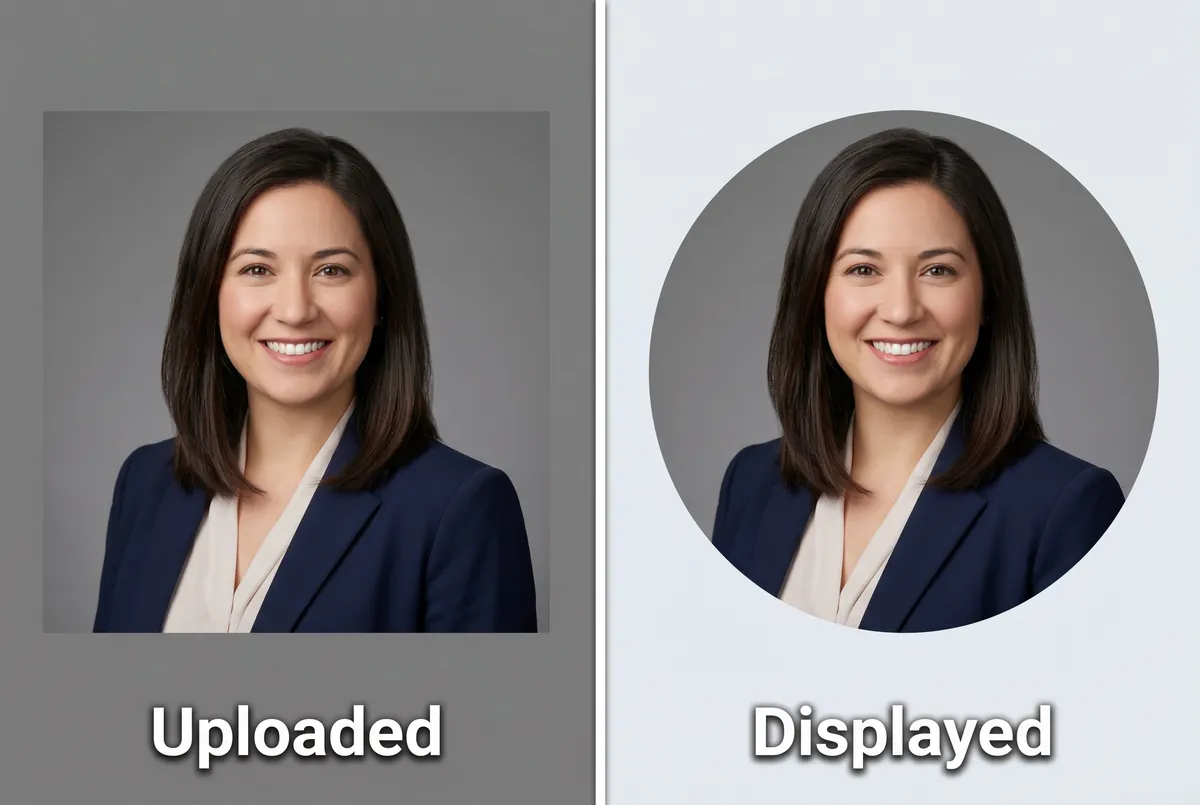
What this means in practice:
- Center your face in the frame. If your face is positioned off-center, part of your head may get clipped by the circular mask.
- Leave breathing room around your head. A tightly cropped photo where your head nearly touches the edges will lose the top of your hair or chin to the circular crop.
- Your face should fill about 60% of the frame. This leaves enough margin for the circle crop while keeping your face as the clear focal point at thumbnail size.
- Avoid text or logos near corners. Anything in the outer 10-15% of the image disappears when LinkedIn crops the square to a circle.
LinkedIn provides a crop adjustment tool during upload, so you can preview exactly how the circular crop will look before saving. Use it. A photo that looks great as a square can lose important details once cropped to a circle. This is especially relevant if your original image is not square, since LinkedIn will force a square crop before applying the circular mask.
How to Resize Your Photo for LinkedIn
If your photo is not the right linkedin photo size, you have three options to get it ready.
On Your Phone
Most smartphones capture photos at much higher resolutions than LinkedIn requires. Open your photo app, choose Edit, and set the crop to 1:1 (square). Center your face, then export. On iOS, the Photos app handles this directly. On Android, Google Photos or the default gallery app both offer square cropping. No third-party app needed.
On Desktop
Use any image editor to crop and resize. On Mac, Preview works: open the photo, select the area you want, choose Tools > Adjust Size, and set both dimensions to 800 pixels or higher. On Windows, the built-in Photos app or a free tool like Canva handles the same workflow. Always export as JPG for the best quality-to-file-size ratio.
With an AI Headshot Generator
If you want a photo that is already perfectly sized, professionally lit, and background-optimized for LinkedIn, an AI headshot generator handles everything. Upload a single casual photo, choose a professional style, and receive a polished linkedin headshot size-optimized result in under a minute. No manual resizing, no cropping, no guessing about pixel dimensions.
ManyPics generates headshots at up to 4K resolution in square format (1:1), sized correctly for LinkedIn and formatted as a high-quality JPG. Upload it directly without any adjustments. Starting at $9 for 10 photos.
All LinkedIn Image Sizes (2026 Reference)
Beyond linkedin profile picture size, LinkedIn has specific dimension requirements for every image type on the platform. Here is a complete reference table for 2026:
| Image Type | Recommended Size | Aspect Ratio | Max File Size |
|---|---|---|---|
| Profile photo | 800 x 800 px | 1:1 (square) | 8 MB |
| Background banner (personal) | 1584 x 396 px | 4:1 | 8 MB |
| Post image (square) | 1080 x 1080 px | 1:1 | 8 MB |
| Post image (portrait) | 1920 x 1080 px | 16:9 | 8 MB |
| Article cover | 1200 x 644 px | ~1.86:1 | 5 MB |
| Shared link preview | 1200 x 627 px | 1.91:1 | 5 MB |
| Company logo | 400 x 400 px | 1:1 | 3 MB |
| Company cover photo | 1128 x 191 px | ~5.9:1 | 3 MB |
| Event banner | 1600 x 900 px | 16:9 | N/A |
| Carousel slide | 1080 x 1080 px | 1:1 | N/A |
A few things worth noting about linkedin photo size across the platform. The background banner displays differently on mobile versus desktop, with the center area being the safest zone for important content. Post images support square, portrait, and landscape formats, but square (1080x1080) gets the most consistent display across devices. Company page cover photos are significantly narrower than personal banners, so the same image will not work for both.
For the official specifications from LinkedIn, see LinkedIn's image requirements.
7 Tips for a LinkedIn Photo That Gets Noticed
Getting the linkedin profile picture size right is the technical foundation. These tips ensure your photo actually helps your career.
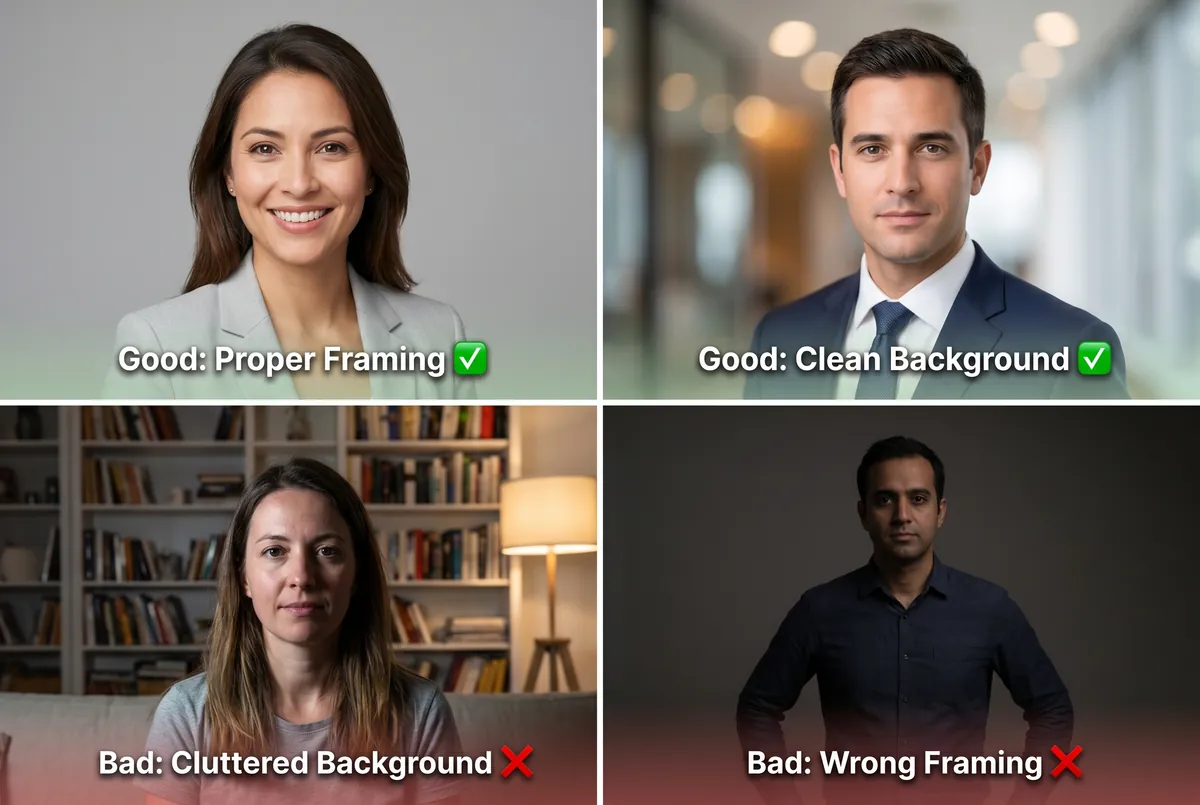
-
Use a recent photo. Your profile photo should look like you do today. If it is more than 2 years old or pre-dates a significant appearance change, replace it.
-
Dress for your industry. Wear what you would wear to an important client meeting. Corporate: blazer or suit. Tech: clean button-down or smart casual. Creative: show personality, but keep clothing secondary to your face.
-
Prioritize good lighting. Natural light from a window, facing you, produces the most flattering result. Avoid harsh overhead fluorescent light, direct camera flash, and backlit situations where your face falls into shadow.
-
Choose a clean background. Solid neutral colors (white, light gray, soft blue) work best for most industries. Your face should be the focal point, not the room behind you.
-
Make eye contact with the camera. Looking directly at the lens signals confidence and trustworthiness. Pair it with a slight, natural smile for approachability.
-
Frame head and shoulders. Your face should fill roughly 60% of the visible frame. Too far away and your expression disappears at thumbnail size. Too close and it feels invasive.
-
Upload at high resolution. At least 800x800 pixels. Higher is better. LinkedIn compresses everything, and more source pixels mean a sharper result after compression.
Common LinkedIn Profile Photo Mistakes
These mistakes reduce your profile's effectiveness and credibility. Each one is straightforward to fix.
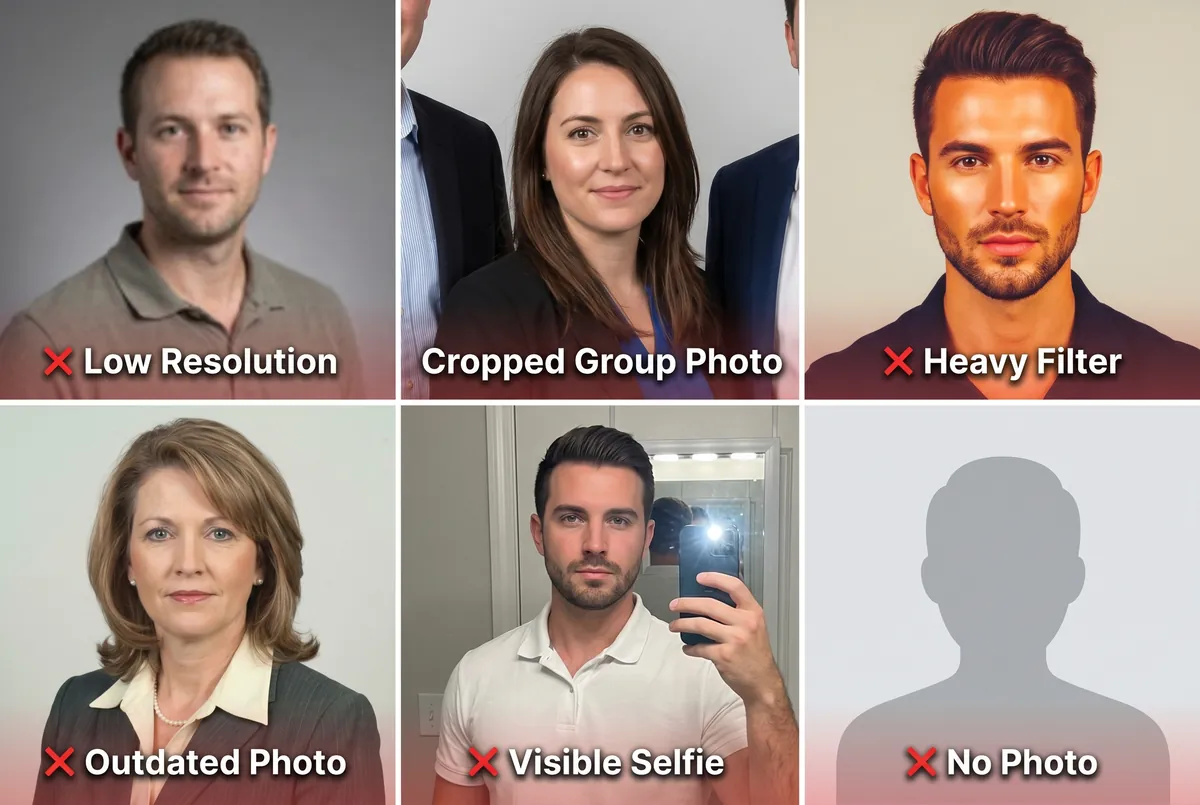
- Low resolution. Uploading a photo under 400x400 pixels results in visible blur and pixelation, especially on mobile. Always verify your linkedin headshot size before uploading.
- Cropped group photo. Visible shoulders, arms, or hair from other people at the edges signals that you did not take a dedicated photo. Recruiters notice immediately.
- Heavy filters. Instagram-style color grading, oversaturated tones, or heavy beautification filters look out of place on a professional platform. Keep edits subtle and natural.
- Outdated photo. If your linkedin profile photo dimensions are technically correct but the photo is from five years ago, it still hurts. Mismatches between your photo and your video call appearance erode trust before any conversation starts.
- Visible selfie setup. A bathroom mirror, an outstretched arm, or a phone case reflection signals low effort. Use a timer or ask someone to take the photo for you.
- No photo at all. LinkedIn profiles without a photo receive dramatically fewer views, connection requests, and InMail messages. Any professional photo is better than the default silhouette.
Frequently Asked Questions
What is the best size for a LinkedIn profile picture?
Upload at 800x800 pixels or higher for the sharpest result. LinkedIn's minimum is 400x400 pixels, but higher resolutions survive compression better on Retina screens and mobile devices. Square format (1:1 ratio) works best because LinkedIn crops your photo to a circle.
Does LinkedIn compress my profile photo?
Yes. LinkedIn compresses every uploaded image to reduce file size and loading time. Starting with a higher-resolution photo (800x800 or above) gives you a buffer against visible compression artifacts like blurriness or color banding.
Can I upload a rectangular photo to LinkedIn?
Yes, but LinkedIn will crop it to a square before displaying it as a circle. You will see a crop tool during upload. For best results, crop your photo to a 1:1 square yourself before uploading so you control exactly what is visible.
How do I change my LinkedIn profile picture?
On desktop, click your profile photo and select "Edit photo." On mobile, tap your profile icon, then tap the camera icon on your photo. LinkedIn lets you adjust the crop before saving. Upload a square image at 800x800 pixels or larger for the best quality.
Should I use the same profile picture on all platforms?
Using the same professional photo across LinkedIn, your company website, and email signature builds visual consistency. Recruiters and clients who find you on one platform will recognize you immediately on another. If you update one, update them all.
The ideal linkedin profile picture size is 800x800 pixels or higher, in square format (1:1), saved as JPG or PNG, under 8 MB. Center your face for the circular crop, upload at the highest resolution available, and pair the right dimensions with a professional photo that has good lighting and a clean background.
If you need a perfectly sized, professionally polished headshot without the hassle, upload one photo to ManyPics and get your result in under a minute. Your first one is free. free ai headshot





Get your AI headshot