Professional Headshot Backgrounds: 8 Options, Ranked by Industry
Compare eight professional headshot backgrounds by industry. Tips on color, contrast, DIY setup, AI headshots, and how to get yours.
Your professional headshot background sets the tone before anyone reads your name. Whether you're learning how to take a professional headshot or updating an existing one, background choice is one of the highest-impact decisions you'll make. Research shows that 94% of first impressions are design-related, and the background is the largest visual element in any portrait. A clean background keeps all attention on your face. A cluttered one splits it.
The short answer: neutral backgrounds (white, gray, or subtle gradient) work for the vast majority of professional contexts. But the best professional headshot background depends on your industry, your clothing, and where the photo will appear. A healthcare provider and a finance executive need different things from their headshot background. This guide covers eight options, breaks down the best choice by industry, and shows you how to get a professional background for headshot photos without booking a studio.
- Neutral backgrounds (white, gray, subtle gradient) work for 80%+ of professional contexts
- Match your background to your industry: clean white for healthcare, dark tones for finance, warm environments for real estate
- Dark clothing on light backgrounds (or vice versa) creates the strongest visual separation
- Your headshot background should look consistent across LinkedIn, your resume, and company websites
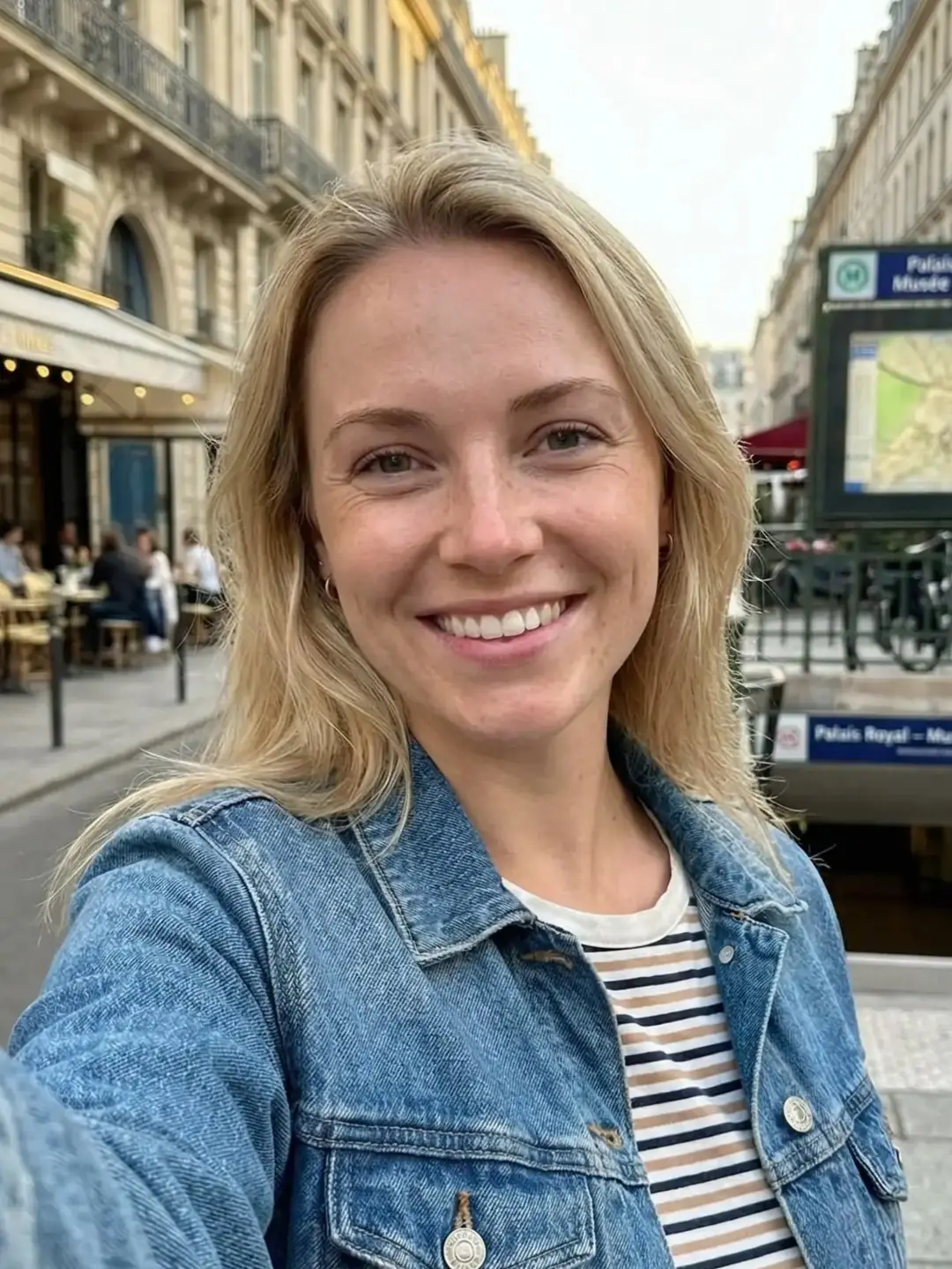
- AI can turn an everyday selfie (average light, busy room) into a studio-style headshot with the background you pick
In This Guide
- Why Your Headshot Background Matters
- 8 Professional Headshot Background Options
- Best Background by Industry
- How to Choose the Right Background
- Background Mistakes to Avoid
- How to Get a Professional Headshot Background
- FAQ
Why Your Headshot Background Matters
People form first impressions from a face in under 100 milliseconds. Your headshot background determines what surrounds that face, and it affects perception more than most people expect.
A clean background directs attention to your expression and eyes. A busy one splits attention between you and whatever is behind you. In studies of profile photo effectiveness, background clutter is consistently rated as one of the top reasons viewers perceive a photo as "unprofessional," second only to poor lighting.
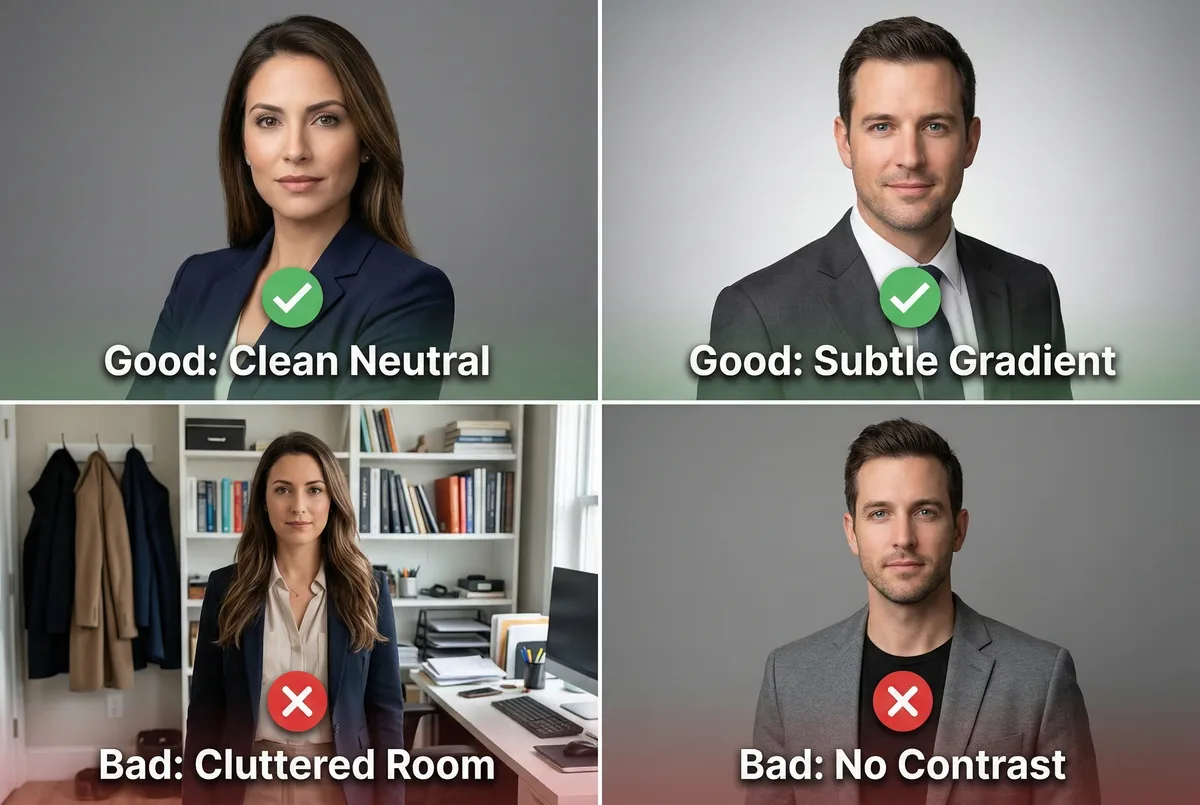
The background also communicates context without words. A solid gray studio backdrop says "corporate." A blurred outdoor setting says "approachable." A bold colored background says "creative." Whether you plan it or not, your headshot background sends a message. The goal is to make sure it sends the right one.
This matters most where headshots appear at small sizes. LinkedIn profile photos display at 100x100 pixels in search results. At that scale, a clean background is the difference between looking professional and looking like a cropped vacation photo.
8 Professional Headshot Background Options
Not every professional headshot background works for every situation. Here are eight options ranked from most to least formal, with guidance on when each one works best.
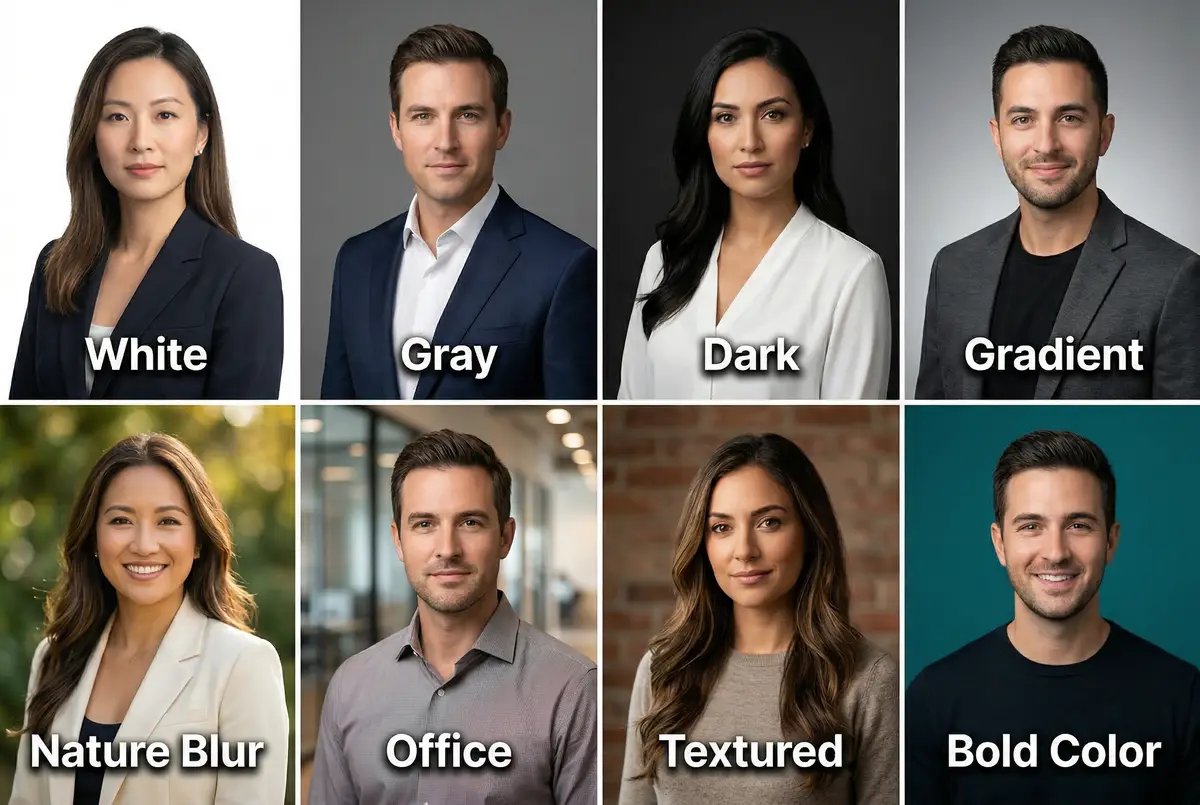
1. Solid White
The most universal choice for professional headshots. White backgrounds are clean, bright, and work across every industry. They keep full attention on the subject and make background removal easy if you need to swap later.
Best for: Corporate directories, healthcare provider listings, passport-style ID photos, any context where the background should disappear entirely.
Watch out for: White can feel sterile if the lighting is flat. Proper studio lighting adds dimension. White also shows every wrinkle in clothing, so dress neatly.
2. Solid Gray
The working professional's default. Medium gray (around 50% gray) adds subtle depth without competing with the subject. It flatters most skin tones and clothing colors, making it the safest single-background choice for any professional headshot.
Best for: LinkedIn headshots, executive portraits, team pages where consistency matters, any professional who wants one headshot that works everywhere.
Watch out for: Very light gray can wash out fair skin tones. Very dark gray starts to feel moody. Stay in the mid-range for the most versatile result.
3. Dark Backgrounds (Black, Navy, Charcoal)
Dark backgrounds create drama and focus. They're the fastest-growing trend in corporate photography, especially for executive headshots and leadership pages. A dark charcoal or navy headshot backdrop signals authority without the starkness of pure black.
Best for: C-suite executives, finance and legal professionals, speaker bios, press features. Any context where you need gravitas.
Watch out for: Dark backgrounds can crush detail in dark hair. Make sure lighting separates the subject from the background. Avoid pure black unless you want a deliberately high-contrast look.
4. Gradient
Smooth transitions from light to dark (or between subtle tones) add visual interest while keeping the composition clean. Gradients feel more modern than flat solid colors and appear frequently in corporate headshots photographed in the last three years.
Best for: Updated corporate headshots, tech companies, modern team pages, any professional who wants something polished but not dated.
Watch out for: Pronounced color shifts can look dated fast. Subtle gray-to-white or charcoal-to-dark-gray gradients age better than blue-to-purple.
5. Nature and Outdoor Blur
Soft, blurred outdoor elements (foliage, sky, parkland) add warmth and approachability. The key is keeping the background out of focus with a shallow depth of field so it adds atmosphere without distraction.
Best for: Real estate agents, wellness practitioners, coaches, educators, anyone in a client-facing role where warmth matters more than formality.
Watch out for: Too much detail pulls attention from the face. The bokeh (quality of the blur) should be smooth and creamy, not muddy. Avoid recognizable landmarks that date or locate the photo.
6. Office and Environmental
Blurred office spaces, conference rooms, or workspaces provide professional context. They say "I work here" without requiring a studio. Environmental backgrounds are effective for founders, consultants, and team leads who want to show their work setting.
Best for: Entrepreneurs, consultants, architects, professionals whose workspace reflects their brand.
Watch out for: The background must be tidy and intentionally staged. A cluttered desk or a visible coat rack kills the effect. Shoot at a wide aperture (f/2.8 to f/4) to keep enough blur while retaining a sense of place.
7. Textured and Pattern
Subtle textures (brick walls, woven fabric backdrops, architectural surfaces) add visual depth without the formality of a studio backdrop. They work for creative professionals who want something distinctive without going bold.
Best for: Designers, writers, marketers, musicians, anyone in a creative field where personality matters.
Watch out for: Busy patterns compete with your face. The texture should be felt, not analyzed. Keep it subtle enough that it registers as "interesting background" not "patterned wallpaper."
8. Bold Colors
Teal, deep red, warm orange, rich green. Bold colored backgrounds make a statement and can tie directly into personal or corporate branding. Color psychology plays a role: blue signals trust, red signals confidence, green signals growth.
Best for: Personal branding photos, social media profiles, creative industries, marketing and media professionals.
Watch out for: The color must complement your skin tone and clothing. Bold backgrounds require careful lighting to avoid color cast on the subject's face. When in doubt, test multiple options with an AI headshot generator before committing.
Best Professional Headshot Background by Industry
The right professional background for headshot photos varies by field. What reads as trustworthy in healthcare looks cold in creative industries. Here are specific recommendations by profession.

Corporate and Executive
Recommended: Dark neutrals (charcoal, navy, near-black) or clean medium gray. The trend has shifted from white toward darker tones for executive headshots over the last two years.
Why it works: Dark backgrounds make the subject's face the brightest element in the frame, naturally drawing the eye. Research shows darker-valued clothing receives higher trust ratings, and dark backgrounds reinforce that same authority.
Pair with: Structured clothing (blazer, suit, dress shirt in darker values). Direct eye contact, composed expression.
Healthcare
Recommended: Clean white, soft blue, or light teal. Light, airy tones that feel clinical without being cold.
Why it works: Patients choose providers partly based on their photo. A study found that 52% of consumers would pick a doctor with a four-star rating and a photo over a five-star doctor without one. The background should feel approachable and hygienic.
Pair with: White coat (preferred by 69.9% of patients in directory photos), genuine smile, open expression.
Legal and Finance
Recommended: Dark blue, charcoal, or black backgrounds. Formal, structured backdrops that reinforce trust.
Why it works: Only 22% of U.S. survey respondents find lawyers trustworthy. The headshot is one of the few chances an attorney has to shift that perception before a consultation. Dark, clean backgrounds signal seriousness.
Pair with: Dark suits (navy, charcoal), squared shoulders, composed expression. A closed-mouth smile for client-facing roles, neutral for litigation.
Tech and Startups
Recommended: Clean white, light gray, or soft blurred modern office environments with warm bokeh. Tech headshots tend to feel lighter and more casual than corporate.
Why it works: Tech culture values approachability over formality. A light, clean background matches the minimal aesthetic most tech companies project.
Pair with: Business casual (crew-neck, blazer without tie, smart polo). Relaxed, genuine expression.
Creative and Marketing
Recommended: Bold colors (teal, warm orange, deep green), textured backgrounds, or editorial environmental settings with color.
Why it works: Creative professionals can afford more personality in their headshot. The background becomes part of the brand statement. Using your brand colors as a headshot background creates immediate visual cohesion across your portfolio. Consider your professional headshot poses carefully, because a bold background amplifies body language.
Pair with: Clothing that complements (not matches) the background. Confident, expressive pose.
Real Estate
Recommended: Warm, blurred environmental backgrounds (residential interiors, outdoor properties, green spaces). Warmer tones and softer backgrounds signal approachability.
Why it works: Real estate is a relationship business. Your headshot appears on signs, flyers, and listing sites where warmth sells. An environmental background shows context and makes you feel grounded and local.
Pair with: Smart casual clothing, warm smile, open body language. Natural lighting when possible.
How to Choose the Right Background
Knowing the options is step one. Choosing between them requires matching the background to four factors.
Match Your Industry
Look at what professionals in your field use. Open LinkedIn and scan headshots in your industry for patterns. If every finance director uses dark backgrounds, choosing a bright teal background won't read as "creative." It'll read as "doesn't understand the norm." Match the convention first, then differentiate through expression and clothing.
Contrast With Your Clothing
Your background and clothing should create clear visual separation. Dark clothing pops against light backgrounds. Light clothing stands out against dark backgrounds. Wearing the same tone as your background makes you blend in.
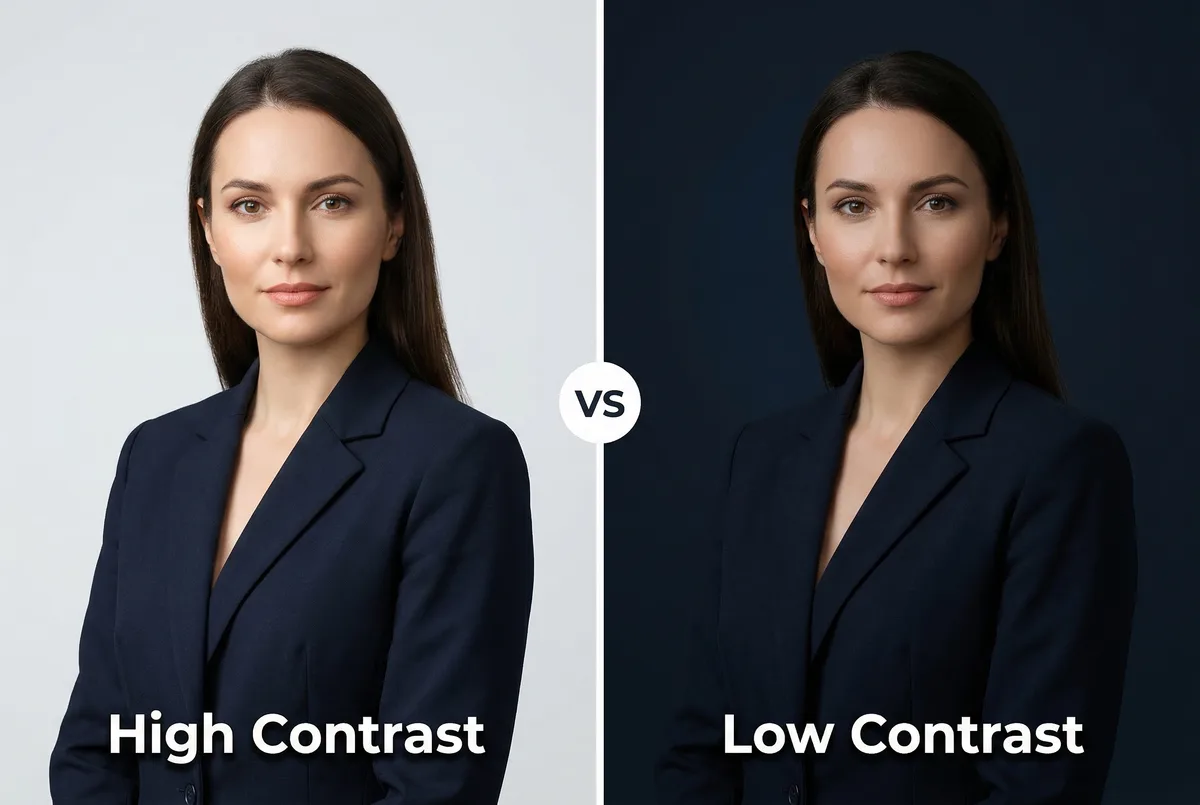
The rule: if you're wearing a navy suit, choose a light gray or white background. If you're wearing a white blouse, choose a darker background. This contrast makes your silhouette sharp and your face the clear focal point.
Consider the Platform
Where your headshot appears affects which background works best.
LinkedIn: Clean and simple. Solid white, light gray, or subtle gradient. LinkedIn profile photos display at small sizes in search, so visual clarity wins. Avoid anything busy.
Corporate website or team page: Match the company's existing headshot style. Many companies standardize on one background (usually white or gray) across all team photos. Check before you shoot.
Resume: Solid white or very light gray. Resume headshots should be conservative and distraction-free.
Speaker bio or conference page: You have more latitude here. Gradients, environmental backgrounds, or subtle color all work. The goal is standing out from other speakers while still looking professional.
Stay Consistent Across Platforms
Use the same or similar professional headshot background wherever your photo appears. Recruiters and clients who see you on LinkedIn, your company website, and a conference speaker page should recognize you instantly. Switching between a white background, a nature scene, and a bold color across platforms creates visual confusion.
Background Mistakes to Avoid
Five common headshot background mistakes that make professional photos look amateur:
-
Cluttered backgrounds. Visible shelves, coat racks, other people, or messy rooms. If the background has identifiable objects, it's distracting. Remove them or blur them out.
-
Backgrounds that match your clothing. A gray blazer against a gray wall, or a navy dress against a navy backdrop. Zero contrast means you disappear. Always check the contrast before shooting.
-
Overly busy patterns. Strong geometric patterns, busy wallpaper, or heavily textured surfaces that compete with your face. The background should be felt, not analyzed.
-
Inconsistent lighting. Your face lit by a window while the background stays dark, or vice versa. Lighting mismatches look like composite photos and break trust.
-
Trendy backgrounds that date fast. Neon gradients, heavily stylized filters, or themed backdrops that look fresh for six months and outdated for years. Neutral backgrounds age well. Your headshot should last 2-3 years minimum.
How to Get a Professional Headshot Background
Three ways to get a professional background for headshot photos: set one up at home, book a studio session, or use an AI headshot generator that replaces the background from photos you already have. Each trades cost, time, and result quality differently.
| DIY | Photographer | AI (ManyPics) | |
|---|---|---|---|
| Cost | $0-50 (wall, fabric, or paper) | $150-400+ per session | Starting at $9 |
| Time | 1-2 hours setup + practice | Half-day (booking, session, delivery) | Under 1 minute |
| Background options | What you hang or stand in front of | Full studio selection | Multiple styles per generation |
| Quality | Depends on light, distance, and skill | Highest for print and campaigns | Strong for LinkedIn, web, and email |
| Best for | Zero budget, learning the basics | Editorial, ads, executive print | Upgrading any photo without reshooting |
DIY at Home
Common backdrop options:
- Plain wall: A single-color wall with no visible frames or outlets. Cool white or light gray reads cleanest on screen.
- Fabric: A bedsheet, curtain panel, or muslin bolt in white, gray, or navy. Iron or steam it first. Wrinkles read as shadows on camera.
- Seamless paper or vinyl: Photography rolls (53" or wider) give a studio-like sweep. Tape the top to a wall and let it curve onto the floor. White and gray are the most versatile; available at camera stores and large retailers.
- Foam board: Two large white boards taped together in a corner work for tight head-and-shoulders crops.
- Sheet or shower curtain: A new matte shower curtain or flat sheet clipped to a clothing rack passes as a backdrop if you stand far enough back for the texture to soften.
Stand at least 3-4 feet in front of the backdrop so it falls slightly out of focus and you separate visually from it. Use window light from the side, not directly behind you. Avoid ceiling-only light, which deepens eye sockets. Hold your phone at eye level. For a full setup walkthrough, see how to take a professional headshot.
DIY works when you have time, a clean surface, and decent daylight. It breaks down when the room is cluttered, the light is flat or mixed, or you need multiple background looks without shooting again.
AI Headshot Generator
This is the strongest option when your starting photo or room is not ideal. You don't need a clean wall or studio lighting first. A selfie with average light, a busy background, or a cropped casual photo can all work as input. The AI rebuilds your portrait with consistent lighting and a clean professional headshot background (white, gray, gradient, or subtle office environment), so the result looks intentional rather than improvised.
Upload a single photo, choose a style, and get several looks in minutes. That matters when you want to test a white background for LinkedIn and a warmer tone for your company website without booking twice. Try our free AI headshot generator to see the difference on your own photo.
For most professionals updating LinkedIn, a company directory, or a resume, this path gives the best result for the time and cost. It doesn't replace a photographer for large-format print, annual reports, or campaigns where a crew controls every variable.
Professional Photographer
A photographer gives you real backdrops, studio lighting, and in-person direction. Choose this for editorial shoots, advertising, or high-stakes executive assets where print resolution and brand precision matter. For everyday digital headshots, DIY or AI covers most needs.
Frequently Asked Questions
What is the best background for a professional headshot?
For most professionals, a neutral solid background (white, medium gray, or subtle gradient) is the safest choice. It works across LinkedIn, resumes, and company websites without distracting from your face. If your industry has specific conventions (dark tones for finance, light tones for healthcare), match those first.
Should a professional headshot have a background?
Every headshot has a background, whether it's a studio backdrop, an environmental setting, or a solid color. The question is whether it's intentional. A deliberately chosen professional headshot background communicates care and professionalism. A random wall or cropped room communicates the opposite.
Is a white or black background better for headshots?
White is more versatile and works in more contexts. Black creates drama and authority but can feel heavy at small display sizes like LinkedIn thumbnails. If you need one background that works everywhere, choose white or medium gray. For executive bios and leadership pages, dark backgrounds work well.
What colors should I avoid for headshots?
Avoid neon colors, overly saturated tones, and any color that clashes with your skin tone or clothing. Bright yellow, hot pink, and lime green rarely read as professional. If you want color in your headshot background, choose muted, deeper tones: navy, teal, burgundy, or forest green. Always test against your outfit.
Can I change my headshot background with AI?
Yes. AI headshot generators produce headshots with different professional backgrounds from a single upload. You choose the style and background type, and the AI generates a complete headshot with that setting. This lets you test multiple professional headshot background options without reshooting or booking a studio.
What background works best for LinkedIn?
White, light gray, or subtle gradient backgrounds perform best on LinkedIn. The platform displays profile photos at small sizes in search, so simplicity and contrast matter most. Avoid environmental or textured backgrounds that lose clarity at thumbnail size. Your face should be the brightest, sharpest element in the frame.
The best professional headshot background is the one that keeps all attention on your face while matching your industry's expectations. For most professionals, that means a clean neutral: white, gray, or subtle gradient. For specific industries, the choice shifts: dark and authoritative for finance and law, light and approachable for healthcare, warm and environmental for real estate, bold and branded for creative fields.
You don't need a studio to get it right. AI headshot generators let you test multiple professional background options in minutes. Upload a photo, choose a style, and get a headshot with the background that fits your brand.





Get your AI headshot