LinkedIn Profile Picture: The Complete 2026 Guide
Everything you need for a great LinkedIn profile picture: what makes a strong photo, examples by industry, best backgrounds, common mistakes, and how to get one fast.
Your linkedin profile picture is the first thing recruiters, clients, and connections see before reading a single word on your profile. A strong linkedin headshot makes people click, connect, and trust you. A weak one gets scrolled past.
LinkedIn profiles with a professional photo receive 14 times more views than those without one, according to LinkedIn's own data. That small circular image carries an outsized share of your first impression. Yet most professionals still use a cropped vacation photo, an outdated selfie, or no photo at all.
This guide covers everything you need to get your linkedin profile picture right: what makes a strong photo, examples by industry, the best backgrounds, the most common mistakes, and three ways to get a professional result in 2026.
- Your face should fill ~60% of the frame with clean lighting and a non-distracting background
- Neutral backgrounds (white, gray, soft blue) work best for most industries
- Upload at 800x800 pixels or higher for sharpness on all devices
- Update your photo every 1-2 years or after any significant appearance change
- An AI headshot generator creates a professional linkedin photo from a single selfie in under a minute
Want a LinkedIn-ready headshot now? Upload one photo and get a professional result in under a minute. free ai headshot
Keep reading for tips, examples, and mistakes to avoid.
In This Guide
- Why Your LinkedIn Profile Picture Matters
- What Makes a Great LinkedIn Profile Picture
- LinkedIn Profile Picture Examples by Industry
- Best LinkedIn Headshot Backgrounds
- Common LinkedIn Profile Picture Mistakes
- How to Get a Professional LinkedIn Photo
- FAQ
Why Your LinkedIn Profile Picture Matters
People form a first impression of your face in about 100 milliseconds, according to research published in Psychological Science. On LinkedIn, that first impression happens before anyone reads your headline, your experience, or your skills. Your linkedin profile picture is the single fastest signal of whether you look professional, approachable, and credible.
The numbers confirm it. Profiles with a professional photo get 14x more views, 36x more messages, and significantly more connection requests than profiles without one. Recruiters scanning search results see a grid of tiny circular photos. A sharp, well-lit linkedin photo stands out immediately. A blurry, poorly framed one blends into the noise.
Your linkedin profile picture also functions as your visual identity across the platform. It appears in search results, comments, messages, article bylines, and the news feed. Every interaction you have on LinkedIn carries your photo alongside it. That one image shapes how hundreds or thousands of people perceive you before any conversation begins.
For job seekers, the stakes are even higher. Hiring managers often check LinkedIn profiles before deciding who to interview. A professional linkedin profile photo signals that you take your career seriously and pay attention to details. It does not guarantee an interview, but a poor photo (or no photo) can silently disqualify you.
What Makes a Great LinkedIn Profile Picture
A strong linkedin profile picture follows a few consistent principles. Every element works together to put focus on your face and communicate professionalism.
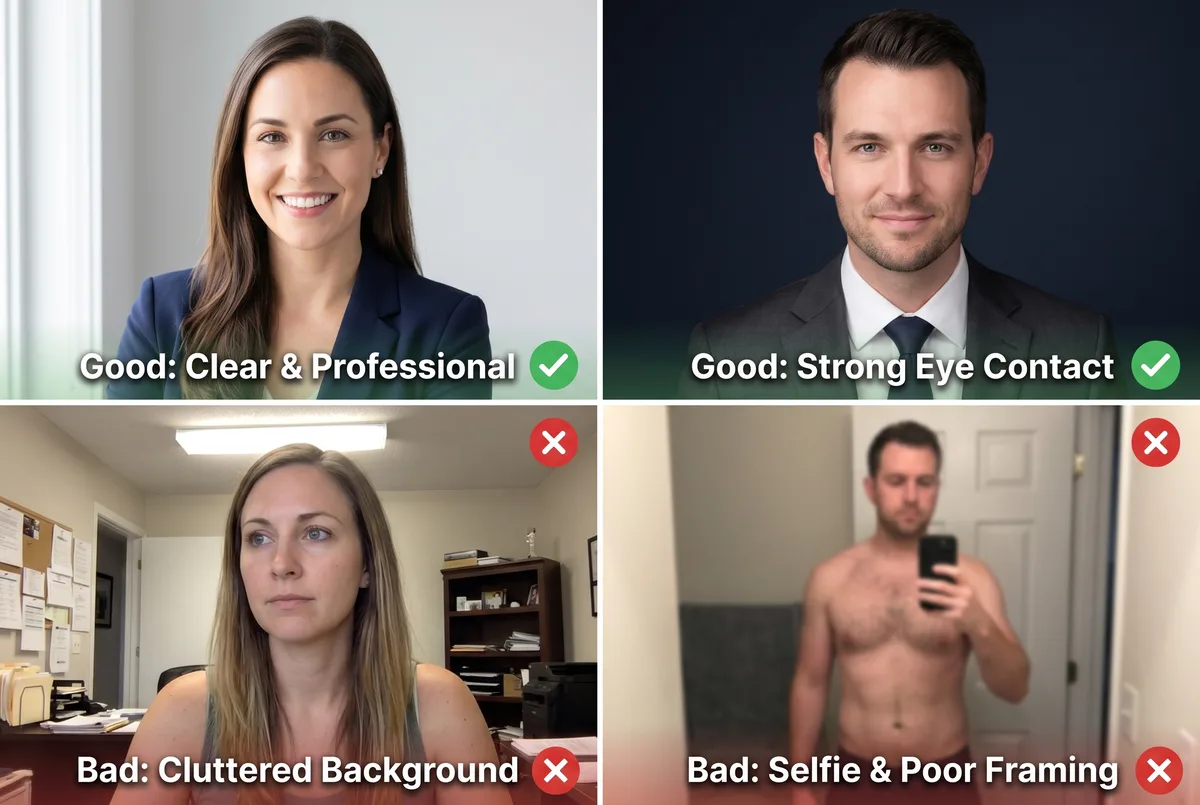
Face Framing and Composition
Your face should fill approximately 60% of the visible frame. Crop from just above your head to your upper chest. This framing keeps your expression clearly visible, even at LinkedIn's smallest display size (48 pixels in comment threads).
Avoid full-body shots where your face becomes a tiny detail. Avoid extreme close-ups that feel invasive. Center your face in the frame, and remember that LinkedIn displays your photo as a circle, so anything near the corners of a square image gets cropped out.
Lighting
Lighting determines 80% of how a photo looks. Natural light from a window, facing you, is the most reliable option. It produces even illumination across your face without harsh shadows under your eyes or nose.
Avoid direct overhead fluorescent lighting (creates unflattering shadows), direct camera flash (makes skin look shiny and flat), and backlit situations where your face falls into shadow while the background is bright. If you are indoors, sit facing a large window during daytime. If you are outdoors, choose open shade or an overcast day.
Background
A clean, non-distracting background keeps attention on your face. Solid neutral colors work for nearly every industry: white, light gray, soft blue, or charcoal. Environmental backgrounds (a blurred office, a bookshelf with shallow depth of field) can work if they add context to your professional identity without competing with your face.
The key test: at thumbnail size, can a viewer immediately identify your face as the focal point? If the background draws equal attention, simplify it.
Attire
Wear what you would wear to an important meeting in your industry. Corporate and finance: blazer or suit in navy, charcoal, or black. Tech and startups: clean button-down or quality crew neck. Creative fields: show personality, but keep clothing secondary to your face. Healthcare: a white coat works if it reflects your daily role.
Solid colors photograph better than busy patterns. Avoid logos, large graphics, or distracting accessories. The goal is for people to see your face first, not your outfit.
Expression
Direct eye contact with the camera is the strongest choice for professional presence. Pair it with a natural, slight smile for approachability. Research from Photofeeler (a platform that analyzes profile photos) found that smiling photos are rated significantly more likable, competent, and influential than neutral expressions.
Forced smiles read as uncomfortable. Practice in a mirror or take several shots and pick the one where your expression looks relaxed. For industries where gravitas matters (law, finance, executive leadership), a composed expression with soft eyes and a closed mouth works well. The key is that your expression looks natural, not staged.
LinkedIn Profile Picture Examples by Industry
Different industries expect different visual signals in a linkedin profile picture. The best linkedin headshot examples share a few things in common: clean framing, good lighting, and attire that matches the culture of the field. Your photo should reflect your industry while still looking polished and professional.

Corporate and Finance
Dark suits or blazers against solid studio backgrounds (charcoal, navy, dark gray). Conservative framing. Composed expression with direct eye contact. The message: reliable, serious, trustworthy. Solid backgrounds work best because they translate cleanly at every display size and communicate formality.
Tech and Startups
Smart casual attire (clean button-down, quality sweater, no tie). Backgrounds can be slightly more relaxed: a softly blurred modern office, a clean white or light gray studio backdrop. Expression tends toward friendly and approachable. The culture is less formal, and your photo should reflect that without looking unprofessional.
Creative and Marketing
More room for personality in both attire and background. Colorful but not chaotic. Environmental backgrounds (a softly blurred creative workspace, an art studio with warm ambient bokeh) can add character. Expression is warm and open. The photo should signal creativity and approachability while still looking polished.
Healthcare and Education
Healthcare professionals often include a white coat or stethoscope for instant recognition. Soft, clean backgrounds (powder blue, white, light mint). Warm, genuine smile. The message: competent and caring. Education professionals follow a similar approach with slightly warmer, more approachable tones and natural lighting.
Best LinkedIn Headshot Backgrounds
Your linkedin headshot background sets the tone for your entire photo. The right background makes your face the clear focal point. The wrong one distracts, dates the image, or sends the wrong professional signal.
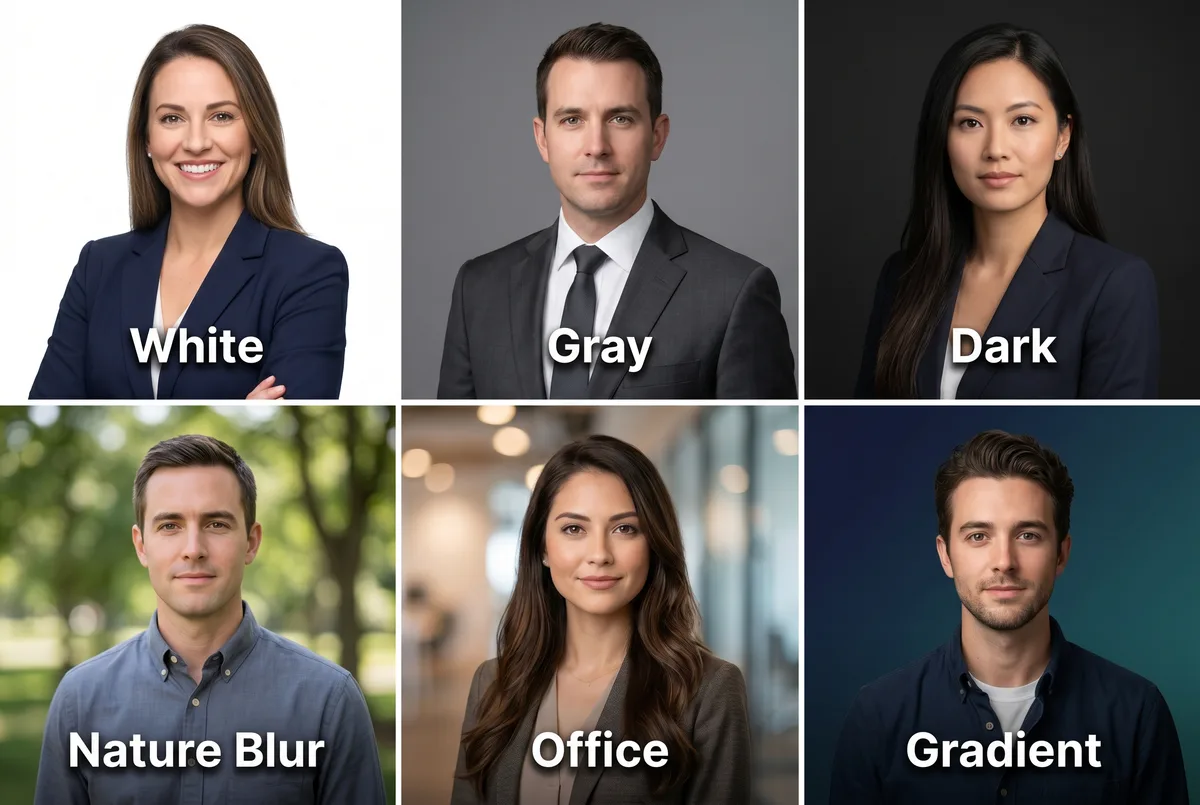
Solid neutrals are the safest choice for any industry. White backgrounds project openness and simplicity. Light gray adds subtle depth without distraction. Dark charcoal or navy conveys authority and works particularly well for executive-level profiles.
Environmental backgrounds add context when done well. A softly blurred office with shallow depth of field tells viewers you are in a professional setting without showing distracting details. A blurred bookshelf, a clean conference room, or a modern workspace with creamy bokeh can all work. The rule: the background should be recognizable as professional but never sharp enough to compete with your face.
Nature blur works for some industries (real estate, education, coaching) where warmth and approachability matter more than formality. Trees, greenery, or architectural elements with heavy bokeh create a relaxed, professional look.
Backgrounds to avoid: Bright red or neon colors (feel aggressive on screen). Busy, cluttered rooms (compete with your face). Other people visible in the background (confusing). A selfie in a bathroom or car (signals low effort). Plain white walls with visible outlets and switches (looks like a mugshot).
For a deeper look at background options and how to choose one for your field, see our guide on professional headshot background.
Common LinkedIn Profile Picture Mistakes
These mistakes are common and each one costs you views, clicks, and credibility. The good news: every one of them is easy to fix.
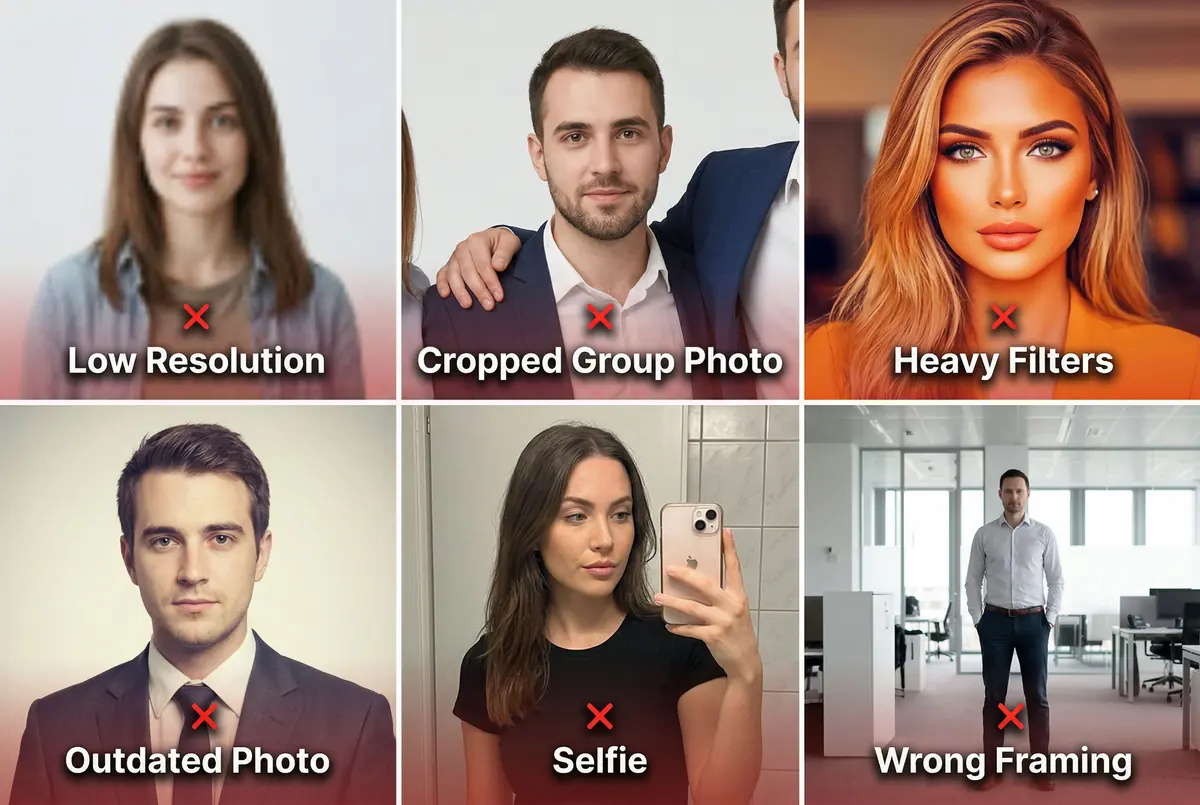
Low resolution. Uploading a photo under 400x400 pixels results in visible blur, especially on mobile and Retina screens. Always upload at 800x800 pixels or higher. For exact specs and resizing instructions, see our linkedin profile picture size guide.
Cropped group photo. Visible shoulders, arms, or hair from other people at the edges signals that you did not take a dedicated photo. Recruiters notice immediately. Always use a solo shot.
Heavy filters. Instagram-style color grading, oversaturated tones, or heavy beautification filters look out of place on a professional platform. Keep edits subtle and natural. Minor brightness and contrast adjustments are fine. Dramatic filters are not.
Outdated photo. If your linkedin profile photo is technically perfect but five years old, it still hurts. When someone meets you on a video call and you look noticeably different from your photo, it creates a trust gap before the conversation even starts. Update your photo every 1-2 years.
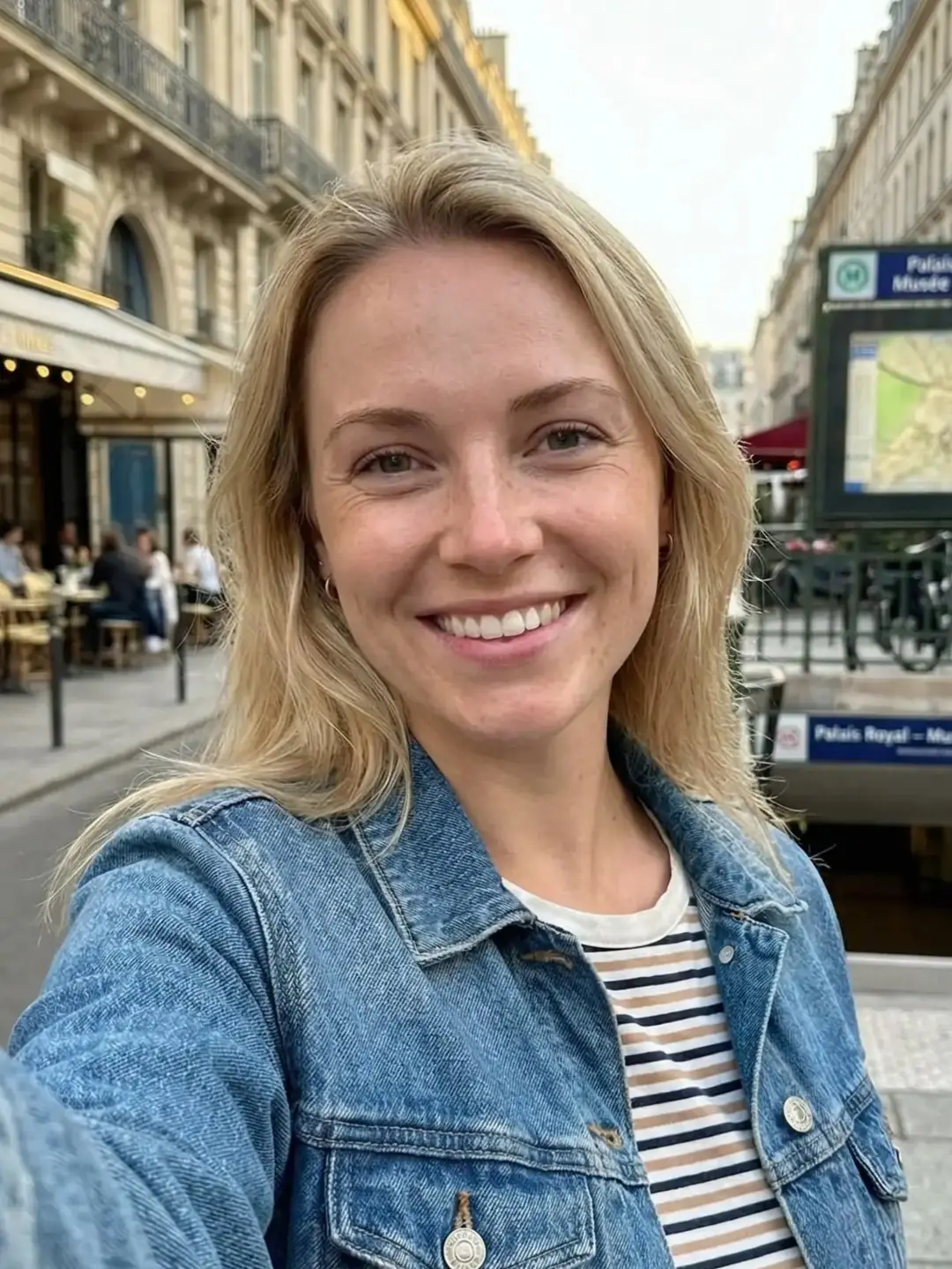
Visible selfie setup. A bathroom mirror, an outstretched arm, or a phone case reflection signals minimal effort. Use a timer, ask someone to take the photo, or use the rear camera on your phone for better quality.
No photo at all. Profiles without a photo receive dramatically fewer views, connection requests, and messages. Any professional photo is better than the default silhouette. If you need one quickly, an AI headshot generator can produce a polished result from a single selfie in under a minute.
How to Get a Professional LinkedIn Photo
You have three practical options to get a professional linkedin profile picture. Each one has trade-offs on cost, time, and quality.
Take It Yourself (DIY)
Stand near a large window during daytime for natural light. Use the rear camera on your phone (higher quality than the front-facing selfie camera). Ask a friend or colleague to take the photo, or use a timer. Choose a clean wall as your background. Take at least 20 shots and pick the best expression.
Cost: $0. Time: 30-60 minutes including setup and selection. Quality: variable, depends on your lighting, background, and how comfortable you are directing yourself.
Hire a Photographer
A professional headshot photographer provides studio lighting, professional equipment, coached posing, and retouched delivery. You get the highest quality result, especially for editorial use, print materials, or on-location portraits where the physical setting is part of the message.
Cost: $150-400 per session (US average). Time: half a day (booking, traveling, session, delivery in 1-2 weeks). Quality: premium.
Use an AI Headshot Generator
An AI headshot generator creates a professional headshot from a single photo. You upload one casual photo, choose a style, and receive a polished, studio-quality result in under a minute. No scheduling, no travel, no waiting for delivery.
ManyPics generates headshots at up to 4K resolution with professional backgrounds and lighting, starting at $9 for 10 photos. Your first headshot is free. Upload it directly to LinkedIn without any resizing or cropping.
Cost: starting at $9 (1 free photo included). Time: under 1 minute. Quality: professional for all digital use cases (LinkedIn, company website, CV, email signature, speaker bio).
For team headshots, AI is particularly strong. Every person uploads at their own pace, and the results are visually consistent across the team. No coordinating schedules, no booking a photographer for 20+ people, no waiting weeks for delivery.
| DIY | Photographer | AI (ManyPics) | |
|---|---|---|---|
| Cost | $0 | $150-400+ | Starting at $9 |
| Time | 30-60 min | Half a day | Under 1 minute |
| Quality | Variable | Premium (editorial, print) | Professional for all digital use |
| Best for | Quick updates, tight budget | Editorial campaigns, on-location | Team headshots, LinkedIn, CV, website |
| Requires | Setup, patience, photo skills | Budget and planning | One photo |
Frequently Asked Questions
What makes a good LinkedIn profile picture?
A good LinkedIn profile picture has clear lighting on your face, a clean background, professional attire appropriate for your industry, and direct eye contact with a natural expression. Your face should fill about 60% of the frame, and the image should be at least 800x800 pixels for sharpness on all devices.
Can I use an AI-generated photo as my LinkedIn profile picture?
Yes. AI-generated headshots are widely used on LinkedIn and visually match traditional studio photos for digital professional use cases. The key is choosing a tool that produces natural, high-resolution results from a real photo of you rather than a fully synthetic image.
How often should you change your LinkedIn profile picture?
Update your LinkedIn profile picture every 1 to 2 years, or whenever your appearance changes noticeably. An outdated photo creates a trust gap when someone meets you on video and you look different. Profile updates also trigger a temporary visibility boost in LinkedIn search results.
What background is best for a LinkedIn profile picture?
Neutral backgrounds in white, light gray, or soft blue work best for most industries. They keep focus on your face and look clean at every display size. Corporate and finance professionals typically use solid studio backdrops, while tech and creative professionals can use softly blurred office or environmental settings.
Should I smile in my LinkedIn profile picture?
A natural smile with direct eye contact is the strongest choice for most professionals. Research from Photofeeler found that smiling photos are rated significantly more likable and competent. For industries like law or finance where gravitas matters, a composed expression with soft eyes works well.
A strong linkedin profile picture follows a simple formula: clear lighting on your face, a clean background, professional attire for your industry, and a natural expression with direct eye contact. Upload at 800x800 pixels or higher, center your face for the circular crop, and update your photo every 1-2 years.
If you need a professional linkedin photo without the hassle of a photoshoot, upload one photo to ManyPics and get a polished result in under a minute. Your first headshot is free. free ai headshot





Get your AI headshot